🌟 Natal Chart Generator
🎯 The Problem
Generating an accurate natal chart requires precise astronomical calculations that account for your exact birth time, geographic coordinates, and the positions of ten celestial bodies across twelve houses. Most free tools online produce bare-bones charts with little explanation, leaving beginners overwhelmed by symbols they cannot read.
⚙️ How It Works in MoonWise
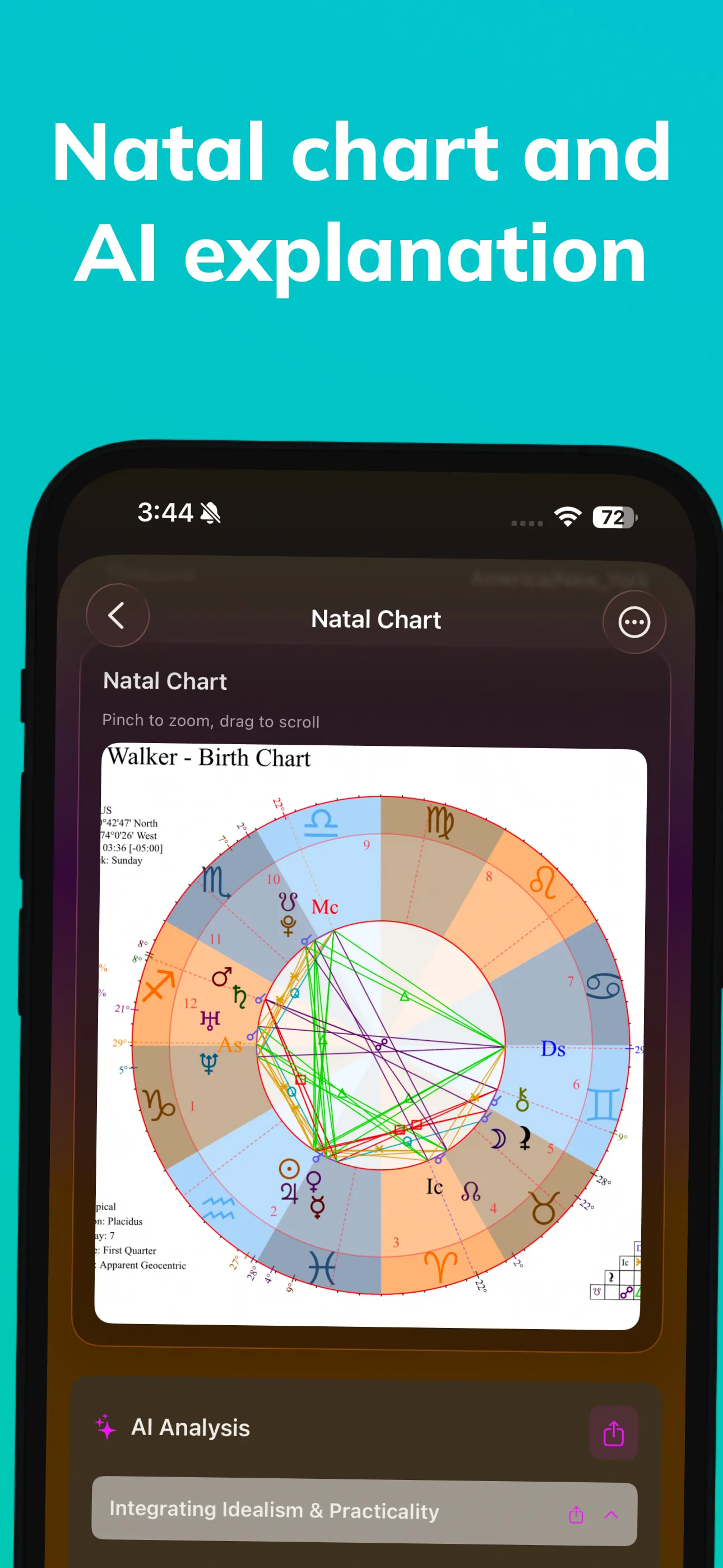
MoonWise calculates your natal chart using Swiss Ephemeris data and the Placidus house system by default, with options to switch to Whole Sign, Equal, Koch, or Campanus. You enter your birth date, time, and location. The app geocodes your birthplace to precise latitude and longitude, then computes planetary positions for that exact moment. The result is a fully rendered chart wheel showing all ten traditional planets, the Ascendant, Midheaven, lunar nodes, and Chiron. Each placement is displayed with its sign, degree, and house. The app also computes every major and minor aspect between planets and presents them in both a grid and a list view. Below the chart, MoonWise provides plain-language interpretations for each placement and aspect. These texts are written by practicing astrologers and reviewed for accuracy. They avoid vague generalities and focus on specific psychological and behavioral patterns associated with each configuration.
What Is a Natal Chart?
A natal chart — also called a birth chart — is a map of the sky at the exact moment and location of your birth. It records where the Sun, Moon, and planets were positioned relative to the zodiac and the local horizon. Think of it as an astronomical snapshot frozen in time.
The chart divides the sky into twelve sections called houses, each associated with a different area of life: identity, finances, communication, home, creativity, health, relationships, transformation, travel, career, community, and the unconscious. Where a planet falls by house and sign shapes its expression in the chart.
Why Birth Time Accuracy Matters
The Ascendant (rising sign) changes roughly every two hours, and house cusps shift even faster. A birth time that is off by just 15 minutes can place planets in different houses, significantly altering the interpretation. MoonWise prompts you to enter the most precise birth time available and flags charts where the time is approximate so you can interpret house placements with appropriate caution.
How the MoonWise Natal Chart Generator Works
Step-by-Step Chart Creation
-
Enter your birth data. Date, time (to the minute if possible), and city of birth. MoonWise searches a database of over 200,000 locations to resolve coordinates and time zone history, including daylight saving adjustments for your birth year.
-
Choose your house system. Placidus is selected by default as the most widely used system. You can switch to Whole Sign houses if you prefer a quadrant-free approach, or select Koch, Equal, or Campanus for comparison.
-
View your chart. The rendered wheel appears with color-coded elements: fire signs in red, earth in green, air in yellow, water in blue. Aspect lines connect planets in the center of the wheel, using standard notation (trine, square, opposition, conjunction, sextile).
-
Read interpretations. Tap any planet, sign, house, or aspect to open its interpretation card. Cards include a brief astronomical explanation, the traditional astrological meaning, and practical suggestions for self-reflection.
Aspect Grid and Orb Configuration
The aspect grid displays every planetary aspect in a compact table. Default orbs follow widely accepted standards (8 degrees for Sun and Moon aspects, 6 degrees for other planets), but you can customize orbs to match your preferred system. Tightening orbs highlights only the strongest aspects; widening them reveals subtler connections.
MoonWise computes conjunctions, sextiles, squares, trines, oppositions, quincunxes, and semi-sextiles. Each aspect is labeled with its exact orb so you can assess its strength at a glance.
Comparing Sun Sign and Moon Sign
One of the most common questions beginners ask is how their Moon sign differs from their Sun sign. The natal chart generator highlights this comparison prominently. Your Sun sign reflects your core identity and conscious goals; your Moon sign reveals emotional needs, instinctive reactions, and comfort patterns. MoonWise presents both side by side with dedicated interpretation texts.
Beyond the Basic Chart
Transit Overlays
Once your natal chart is saved, you can overlay current astrological transits to see which planets are activating natal placements right now. This turns a static birth chart into a living tool for daily reflection. Transit alerts notify you when a slow-moving planet forms an exact aspect to a natal position.
Multiple Chart Storage
MoonWise lets you save charts for family members, friends, or clients. Each chart is stored locally and optionally synced via iCloud. You can quickly switch between charts and compare aspect patterns.
Synastry Preview
Premium subscribers can overlay two natal charts to explore relationship dynamics. The synastry view highlights inter-chart aspects and house overlaps, with interpretive text for each connection found.
Who This Feature Is For
The natal chart generator serves both beginners exploring their chart for the first time and intermediate students who want a portable reference. The interpretations are educational rather than predictive — MoonWise explains what each placement traditionally represents without making deterministic claims about your life.
The basic natal chart is available on the free tier. Full interpretations, transit overlays, synastry, and custom orb settings require MoonWise Premium ($9.99/mo or $79.99/yr).
Try it in MoonWise
Track moon phases, void of course periods, lunar days, natal charts, and planetary retrogrades. Education first, then precision tools.
Free Download on App Store